
A warehouse management system, or WMS, is software that controls and coordinates everything that happens inside a warehouse or distribution center. From the moment goods arrive at the receiving dock to the moment an order ships out, the system tracks inventory, directs workers, manages storage locations, and records every movement in real time. It functions as the operational backbone of any warehouse management solution, whether that runs a single facility or a distribution network spanning dozens of countries.
For companies running mission-critical service parts logistics across multiple locations, a WMS has to do more than track boxes on shelves. It connects inventory data to order management, transportation, and enterprise systems, giving operations teams a clear and accurate picture of what they have, where it is, and what needs to happen next, down to the individual forward stocking location, not just the facility. That visibility is what protects SLA attainment: it keeps a part moving on schedule and gives management the information they need to act before a delay becomes a missed delivery.
Software alone does not get a part to a technician on time. What separates a generic WMS from a system built for this environment is the operating model behind it. Choice runs Compass, a proprietary platform unifying WMS, OMS, and TMS as one system across 500-plus warehouse locations in 100-plus countries, paired with a live order management team that actively monitors every open order and steps in before an exception turns into a missed SLA. A network and a technology stack built specifically for mission-critical service parts logistics is what makes single point of accountability and global visibility possible, not the software module on its own.
How Does a Warehouse Management System Work?
A WMS works by tracking and directing every physical movement of goods inside a warehouse, from inbound receiving to outbound shipping. Rather than relying on spreadsheets, paper logs, or memory, warehouse managers and workers get a single system that records what comes in, where it goes, who handles it, and when it leaves.
When a shipment arrives, the WMS logs it against an expected purchase order or advance shipping notice, flags any discrepancies, and then directs workers on where to put each item based on storage rules, product type, and available space. That warehouse management process is called directed put away, and it removes the guesswork from storage decisions entirely.
Once inventory is in place, the system maintains a live record of every stock location across the warehouse. When an order comes in, the WMS generates a pick list and routes workers along the most efficient path through the facility to collect the right items. Order picking accounts for over half of total warehousing costs, so that routing logic carries real weight in what the facility spends.
It then directs the packing process, prints shipping labels, updates inventory levels the moment a shipment goes out the door, and sends automated shipping notifications so customers and downstream teams know the moment a shipment moves.
Throughout all of this, the system feeds real-time data to warehouse managers so they can monitor order status, track worker productivity, spot bottlenecks, and make adjustments while there is still time to act. Automating tasks such as put away routing and label printing is part of what makes this level of oversight possible without adding headcount.
For operations that span multiple warehouses, a WMS consolidates that visibility into a single view, which is what lets a team control daily warehouse operations across every location instead of one facility at a time.
The Four Types of Warehouse Management Systems
Not every WMS is built the same way, and the right choice depends on the size of the operation, the complexity of the supply chain, and how the system needs to connect with other business tools.
Buyers comparing the best warehouse management systems on the market usually run into four main types.
Standalone WMS
A standalone WMS system is a dedicated system built specifically for warehouse operations, separate from any broader distribution management or ERP suite. It covers the core functions, such as inventory tracking, receiving, picking, packing, and shipping, without being bundled into a larger software suite.
Small to mid-sized businesses tend to start here because it brings structure and visibility to daily warehouse operations without the cost of a full enterprise platform, though standalone systems often have limited integration capabilities with other business systems, which can create data gaps once an operation outgrows a single site.
Supply Chain Management Modules
Some companies manage warehouse operations through a module within a broader supply chain management platform.
Warehouse management, procurement, supplier coordination, and logistics planning all draw from the same data environment. This reduces manual data transfers between systems and gives planners a more complete picture of inventory from source to delivery.
ERP-Integrated WMS
Enterprise resource planning systems, commonly called ERPs, manage core business functions such as finance, human resources, procurement, and customer relationship management from a single platform.
Many ERP providers include a warehouse management module as part of that package, so inventory data flows directly into accounting, invoicing, and procurement without additional integration work.
The limitation is that ERP warehouse modules are rarely as deep or as configurable as a purpose-built WMS, so businesses with complex warehouse operations often find them insufficient on their own.
Cloud-Based WMS
A cloud-based WMS runs on remote servers rather than on hardware installed at the warehouse, and users access it through any internet-connected device. It receives updates automatically and scales as business needs change without anyone managing on-site infrastructure.
For a global service parts network, this matters for a specific reason: the platform has to stay live around the clock, since a part might need to move from a forward stocking location at any hour, in any time zone.
A cloud architecture built for that kind of constant availability is what keeps a network of warehouses working as one system instead of dozens of disconnected ones, with every location seeing the same data the moment it changes.
Core Features of a Modern WMS
A warehouse management system is only as good as what it can actually do day-to-day. The features below are what separate a system that genuinely improves warehouse operations from one that just digitizes existing problems.
Inventory Management
Inventory management is the foundation of any WMS. The system maintains a live record of every SKU across every storage location and updates that record automatically as goods move through the warehouse.
Warehouse managers can see exactly what they have on hand, what is reserved for open orders, and what needs to be replenished, which is one of the core inventory management features that separates a real WMS from a spreadsheet.
For businesses that run multiple warehouses, the system consolidates that data into a single inventory view so stock levels across every location are always current and accurate.
Inventory Tracking and Inventory Control
Inventory tracking goes a level deeper than knowing what is in stock. A WMS tracks the precise location of every item within the warehouse- which bin, which shelf, which zone- and follows it through every stage of its journey from receiving to shipping.
Inventory control features build on that by giving managers the ability to set reorder points, manage product batches, monitor expiration dates where relevant, and run cycle counts without shutting down operations, part of the broader set of warehouse management capabilities that keep stock data reliable.
Warehouse teams that previously spent hours reconciling stock discrepancies manually find that these two capabilities alone justify the investment in a WMS.
Inventory Accuracy
Poor inventory accuracy is one of the most expensive problems a warehouse can have. Miss-picks, phantom stock, and discrepancies between system records and physical counts lead to delayed orders, excess purchasing, and short-shipped customers.
A modern WMS addresses this through directed workflows that confirm each action at the point of execution. Workers scan, verify, and record every movement rather than relying on memory or paper records, so the data in the system reflects what is physically in the building.
Barcode Scanning
Every time a worker receives a shipment, picks an item, packs an order, or moves stock between locations, the WMS captures that action through a barcode scan. The system records it instantly and updates inventory data across the board, so there is no manual entry, no paper log to reconcile later, and no lag between what physically happened and what the system shows.
More advanced WMS platforms also support RFID technology, which reads multiple items at once without requiring a direct line of sight, and 77% of warehouses now use mobile and wireless technologies of this kind for data collection.
In a distribution center that processes hundreds of shipments per shift, that difference between scanning items one at a time versus reading an entire pallet in seconds adds up across every receiving and picking cycle throughout the day.
Labor Management
Warehouse labor is expensive, and without data attached to specific people and specific tasks, managers have no way to know where time goes or why output varies between shifts. A WMS changes that by recording exactly what each worker does throughout the day, which orders they picked, how long each task took, and where they spent time between assignments.
With that information, managers can distribute work more evenly, catch bottlenecks before they back up an entire shift, and build schedules around what the data shows. WMS platforms that apply this data well can reduce labor planning costs by up to 20 percent.
Order Fulfillment
When an order comes in, the WMS takes it through every step without requiring manual coordination between teams, streamlining warehouse operations from the moment a purchase is confirmed.
It checks stock, builds a pick list, routes the worker through the warehouse in the shortest sequence possible, confirms the pack, and generates the shipping label.
For warehouses that process large order volumes, the system groups multiple orders into a single picking run so workers move through the facility once and collect items for several shipments at the same time, which directly increases how many orders go out the door per shift.
Inventory Forecasting
A WMS pulls order status, inventory levels, worker output, and shipment progress into a single dashboard that updates continuously throughout the day, and most platforms track key performance indicators as part of that view, with analytics that generate visual reports for stakeholder sharing.
If a product is moving faster than expected or a supplier lead time is long, the system flags it early enough to act on.
Companies in technology hardware, medical devices, or industrial equipment, where a single stockout can breach a service level agreement with a client, rely on this capability to keep their commitments.
Mile Management
Before a single item enters the warehouse, the yard has to run on schedule. A WMS with mile management tracks every inbound and outbound vehicle, assigns dock doors based on what labor is available and which loads take priority, and times arrivals so trucks are not sitting idle while a dock clears.
Warehouse layout optimization features often extend into the yard itself, since dock assignment and floor layout are part of the same flow.
When mile coordination breaks down, the delays do not stay outside. They move into receiving, then into storage, and eventually into order fulfillment, so keeping the mile connected to the same system as the warehouse prevents that chain reaction from starting.
Real-Time Visibility and Reporting
Warehouse managers cannot fix what they cannot see. A WMS pulls order status, inventory levels, worker output, and shipment progress into a single dashboard that updates continuously throughout the day.
When a shipment falls behind, when stock drops below a set threshold, or when a picking zone slows down, the system flags it immediately so managers can act on it mid-shift rather than reading about it in an end-of-day report.

The Key Benefits of a Warehouse Management System
Companies that move from manual or spreadsheet-based warehouse operations to a proper WMS notice the difference across every part of the business, not just inside the warehouse. These are the most significant ones.
Improved Inventory Accuracy
When every stock movement goes through a scan and the system records it instantly, the gap between what the records say and what is physically on the shelf closes fast.
Teams that previously ran weekly or monthly counts to catch discrepancies find that cycle counts become shorter and less frequent because the data stays clean between them.
Fewer discrepancies also mean fewer short shipments, fewer emergency replenishment orders, and fewer conversations with customers about orders that went wrong.
Better Operational Efficiency
A WMS removes the manual coordination that slows warehouse operations down. Workers follow directed tasks rather than making their own decisions about where to go and what to do next, which means less time wasted on inefficient routes through the facility and more time spent on productive work.
The biggest gains in warehouse efficiency typically show up in:
Faster Order Fulfillment
Customers expect orders to ship quickly and arrive on time, and a WMS directly supports that by removing the delays that build up between an order arriving and a shipment leaving.
The system processes orders as they come in, allocates stock immediately, and moves the fulfillment task to the floor without waiting for manual review.
For companies that operate in industries with strict service level agreements (SLA's), such as technology hardware or medical devices, that speed is not a competitive advantage so much as a baseline requirement.
Real-Time Data Across the Entire Supply Chain
One of the most practical benefits of a modern WMS is that the data it produces does not stay inside the warehouse.
When the system connects to an order management system, a transportation management system, or an ERP, inventory levels, order status, and shipment data flow across the entire supply chain in real time. Procurement teams know when to reorder. Sales teams know what is available to promise. Finance teams see accurate cost data without waiting for month-end reconciliation.
Everyone works from the same numbers at the same time.
Reduced Operating Costs
The cost reductions that come from a WMS are not limited to one area. They accumulate across several:
|
Area |
How a WMS Reduces Cost |
|
Labor |
Directed tasks cut wasted movement and overtime |
|
Inventory |
Accurate stock data reduces over-purchasing and write-offs |
|
Space |
Directed put away fills warehouse space more efficiently |
|
Returns |
Faster, more accurate picking means fewer returns from miss-picks |
|
Carrier costs |
Automated carrier selection finds the best rate at the point of shipping |
Stronger Customer Satisfaction
A missed or wrong part costs more than the cost of the part itself. It costs the technician's time on site, the rescheduled visit, and often the SLA window the client committed to. A WMS catches errors at the picking stage, before a shipment ever leaves the building, which helps keep first-time fix rates high and downtime low for mission-critical equipment.
For service parts specifically, serialization and condition tracking add another layer of accuracy, confirming not just that the right part shipped, but that it is the right unit, in the right condition, for a warranty or repair claim to hold up. Over thousands of shipments a month, that level of checkpoint discipline is what keeps SLA attainment where it needs to be.

WMS vs. Other Business Systems
A warehouse management system does not work in isolation. Most operations run it alongside several other platforms, and knowing where each one begins and ends saves companies from expensive overlaps and blind spots in their supply chain.
WMS vs. Order Management Systems
An order management system, or OMS, manages the customer-facing side of fulfillment. It routes orders, allocates inventory across sales channels, and keeps customers informed about their shipment status.
The WMS handles what happens next: everything that occurs physically inside the warehouse to get that order out the door.
The two systems serve different purposes:
Running one without the other creates gaps. An OMS alone has no visibility into the warehouse floor. A WMS alone fulfills orders efficiently but lacks the routing and customer communication layer that modern fulfillment demands.
WMS vs. Transportation Management Systems
A transportation management system, or TMS, takes over the moment a shipment leaves the warehouse. It handles carrier selection, freight costs, route optimization, and delivery tracking.
The WMS passes order details, weight, dimensions, and destination to the TMS at the point of shipment so the right carrier and service level get selected automatically, without anyone making manual decisions between the two systems.
When WMS and TMS share data in real time:
WMS vs. Enterprise Resource Planning
Enterprise resource planning software, or ERP, runs the business at a financial and operational level. Accounting, procurement, human resources, invoicing, and customer relationship management all typically live inside an ERP such as SAP or Oracle.
A WMS feeds inventory and fulfillment data into the ERP, so financial records, purchase orders, and customer accounts stay current without anyone manually transferring data between systems.
The distinction matters because many ERP providers include a basic warehouse module as part of their package. For businesses with straightforward warehouse needs, that distinction may not matter much. For those running complex supply chain logistics across multiple warehouse locations, or those that work with a third-party logistics provider, that basic module rarely goes deep enough.
A dedicated WMS with seamless integration into the ERP almost always gives operations teams more control over daily warehouse operations than an ERP module alone ever could, and it does more to optimize warehouse operations across multiple sites.
Cloud-Based WMS vs. On-Premise
When a company decides to implement a warehousing management system, one of the first decisions it faces is where the software actually lives. There are two models: on-premise, where the software runs on servers physically located at the warehouse, and cloud-based, where it runs on remote servers and warehouse teams access it through any internet-connected device.
On-premise WMS software was the standard for decades. Companies bought a license, installed the system on their own hardware, and managed everything in-house. The data stayed on site, and IT teams could customize the system to fit specific warehouse processes without depending on an outside vendor, but that control came at a price.
Every update required downtime, hardware needed regular maintenance and eventual replacement, and scaling to new warehouse locations meant buying and configuring additional infrastructure each time, which made growth slower and more expensive than it needed to be.
Cloud based WMS systems work differently. The vendor hosts and maintains the software, pushes updates automatically, and handles the infrastructure entirely. Warehouse teams log in from any device, whether they are on the floor with a handheld scanner or reviewing reports from a different office, and they see the same live data across every warehouse location without any additional infrastructure investment.
The shift toward cloud based WMS has accelerated for several reasons:
|
Factor |
On-Premise WMS |
Cloud-Based WMS |
|
Upfront cost |
High, hardware and licenses |
Low, subscription based |
|
Updates |
Manual, require downtime |
Automatic, no disruption |
|
Scalability |
Slow, requires new hardware |
Fast, add locations quickly |
|
Access |
On-site only |
Any device, anywhere |
|
IT burden |
High, managed internally |
Low, managed by vendor |
|
Integration |
Complex with modern systems |
Straightforward via API |
For most businesses today, and particularly for those that work with a third-party logistics provider or that operate across multiple warehouse locations, a cloud-based WMS is the more practical path. The software as a service model means lower upfront investment, predictable monthly costs, and a system that stays current without anyone on the internal team managing it.
On-premise still makes sense in specific situations, such as operations in regions with unreliable internet connectivity or industries with strict data residency requirements that prevent storing information on external servers.
Outside those scenarios, cloud-based WMS systems have become the default choice for companies that want efficient warehouse management without the overhead of running their own logistics software infrastructure.
How to Choose the Right Warehouse Management System
Finding the right warehouse management system comes down to matching the software's capabilities to the actual complexity of the operation.
Companies generally face two paths here: license a WMS and run it themselves, or partner with a 4PL like Choice Logistics, where customers don't buy a WMS. They gain access to an enterprise-grade technology platform, along with the team of experts behind it, as part of the full benefits of a 4PL service.
These are the factors worth evaluating:
How Choice Logistics Approaches Warehouse Management
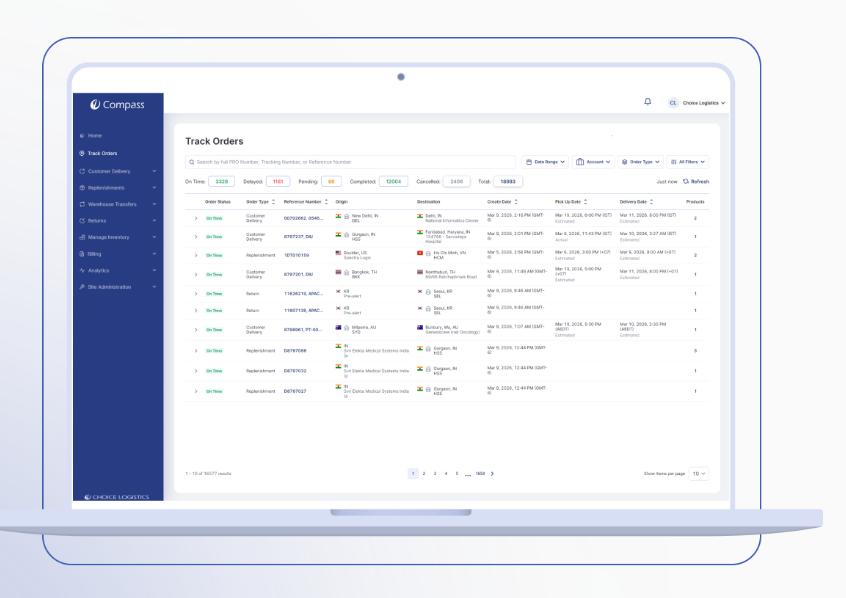
Choice runs on Compass, a proprietary platform shaped over 30 years by direct client feedback rather than a generic vendor roadmap. A dedicated team of 40-plus developers works on Compass alone, tuning it to the specific needs of various industry verticals, such as technology infrastructure or medical device service parts, where a generic 3PL platform falls short.
Compass unifies WMS, OMS, and TMS as one system across 500+ warehouse locations in 100+ countries. 85% of transaction volume flows through systemic integration, and platform uptime holds at 99.99%.
For a client whose technician needs a part on site within hours, that uptime number is not a marketing figure. It is the line between a job finished on schedule and a missed SLA.
Inventory accuracy across the network runs at 99.9%. Serialization and condition tracking are built into the workflow for high-value technology and medical device parts, so a warranty or repair record holds up when a client needs it.
The WMS sits within a fully integrated technology stack that covers order management, transportation management, and global trade services, so data moves across the entire supply chain automatically.
None of this runs on software alone, as a human team actively manages orders and steps in on exceptions in real time, before a delay turns into a missed delivery. A platform built for mission-critical service parts logistics, paired with people who manage it actively, is what separates Choice from a generic 3PL running an off-the-shelf WMS.
Warehouse Management System FAQs
See how Compass manages inventory across 500+ global locations.